Case study / Wealth Tech
NeoFinDesk
Designing one interface for twelve asset classes, and the client onboarding that feeds it.
- Role
- Lead Product Designer, design and frontend
- Team
- Me, 1 junior designer, 1 PM, 1 QA
- Company
- InvestValue Fintech
- Timeline
- 2025 to present
- Surface
- Desktop web, 1920 grid
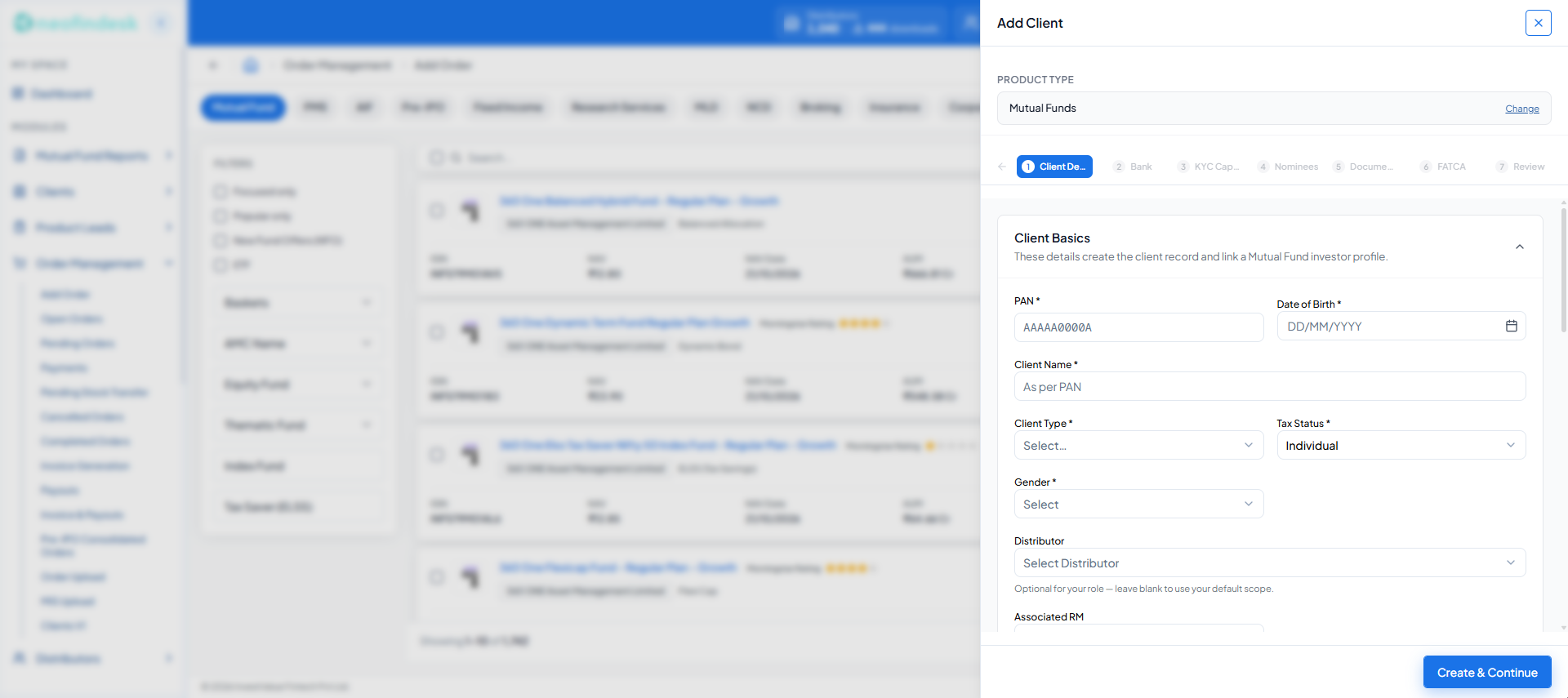
- The Add Order list stays in place behind the drawer. Close it and the advisor is back where they were.
- Seven steps, ordered by dependency: client details, bank, KYC, nominees, documents, FATCA, review.
- Each section says why it exists, so a required field is never a mystery.
- Optional fields say so, and say what happens if they are left blank.
6×
Faster client onboarding
12 → 16
Asset classes in one order shell, launch to today
540+
Institutional and distribution partners
2,077
Component variants in the library
The problem
Advisors sell across twelve asset classes on three or four issuer portals. To onboard a client they had to leave a live order for a separate tool, and the order usually became a call-back the next day.
What I did
Led design with one junior designer, and built the frontend and coded component library myself: one order shell for twelve classes, onboarding in a drawer over the order, and all sixteen gating conditions designed.
The result
Client onboarding fell from about 30 minutes to under 5, 6× faster, by system timestamps over the first three months. Twelve asset classes now run through one order pipeline.
Context
In India, wealth distribution still runs on relationships and spreadsheets. One advisor sells mutual funds through an issuer’s portal, PMS through another, and insurance through a third. Pre-IPO paper moves over email and WhatsApp. Add fixed income, NCDs, MLDs, loans, broking, AIF, research services and a catch-all for everything else, and that one advisor is working across twelve asset classes that share nothing but the client.
Nobody had brought them together, and not because the interface is hard to draw. It is that the products genuinely behave differently underneath. Flatten them into a single design and it holds up right until a real order goes through.
NeoFinDesk is InvestValue’s answer to that: a multi-issuer wealth tech marketplace, which the company positions as India’s first.
I own the design end to end, from research through the component library.
Twelve asset classes, each arriving with its own issuer portal, its own onboarding, its own commission structure and its own settlement cycle. These are the twelve the shipped Open Orders filter lists, in the same order. Colours are drawn from NeoFinDesk’s own chart palette.
The problem, stated honestly
Watch a relationship manager place an order and you see the actual job. They are not browsing. They have a client on the phone, a number in their head, and a compliance window closing. The interface is standing in the middle of a conversation.
Three things were costing them time.
- 01
Onboarding is a wall, not a step
A client who is not KYC-registered cannot transact. The advisor discovers this at the moment of the order, leaves for a separate tool, loses their place, and calls the client back tomorrow.
- 02
Every product is a different application
Twelve asset classes, each behaving like its own application, with no shared layout or vocabulary between them. Learning twelve ways to place an order means mastering none of them.
- 03
Nothing tells you where you are
Thousands of orders across four states, rendered identically. Nothing shows which are blocked, which are waiting on you, or which need action today.
My role and the team
I led design with one junior designer reporting to me, and built the frontend and the coded component library myself against APIs from a separate backend team. That shaped how I spent my time: I kept the decisions that set direction, the order shell, the onboarding model and the system architecture, and handed over work that would grow the junior designer, reviewing it before it reached the build.
1
Lead Product Designer (me)
Research, IA, the core flows and the design system. I also built the frontend and the component library in code.
1
Junior Product Designer
Reported to me. Owned the empty, loading and error states, and supported research.
1
Product manager
Roadmap and scope. My counterpart in the one real disagreement on this project.
1
QA engineer
Partner in design QA before each release.
2–4
Backend engineers, separate team
Owned the backend and APIs. I built the frontend against them.
2
Partner teams: compliance and ops
Stakeholders, not headcount. Compliance owned the KYC non-negotiables; ops owned the support queue.
I owned
- Research plan and synthesis
- Information architecture across sixteen modules
- The order shell and the UCC drawer, Decisions 01 and 02
- The audit of all sixteen gating conditions in the code
- Design system: tokens, variant model, usage docs
- The frontend build and the coded component library
I delegated to the junior designer
- Empty, loading and error states across the Order Management screens
- Research support: notes and synthesis on interviews and shadowing
We did together
- Weekly design critique, with both of our work on the table
- Design QA with our QA engineer, catching about 20 UI bugs before release
By screen count, I designed about 80% of what shipped and the junior designer about 20%. Within two months they were owning flows on their own and shipping them without my edits.
Constraints I could not design away
Being clear about these early is what kept the work honest. None of them were negotiable.
- KYC is statutory. CVL KRA registration, FATCA and CRS declarations, nominee records and BSE STAR MF onboarding are legal requirements, not form fields I get to trim for elegance.
- PAN and client name are immutable once a client record exists. That is a regulatory and database fact, and the interface has to carry it.
- Twelve asset classes hold genuinely different data. A mutual fund has an ISIN, a NAV and an AMC. A pre-IPO holding has a lot size and a settlement date. Insurance has a premium term. Forcing them into one schema is a lie that surfaces later as an error.
- One screen, four roles. An in-house RM, a distributor, a distributor’s employee and an intern all see the same page with different data scope.
Fixed by law, data or the database
- KYC sequence
- CVL KRA registration
- FATCA and CRS
- Nominee records
- BSE STAR MF onboarding
- PAN and client name
- Per-product data shape
- Role data scope
Mine to move
- Where onboarding lives
- Step sequencing
- Progressive disclosure
- Error copy
- State design
- Layout and hierarchy
- Shared vocabulary
The first item in that second row is the whole project. The steps could not be shortened, but where they happened was never fixed.
Who I was designing for
The same page is read by four people with four different rights to the data on it. Getting the scope wrong does not produce a bad layout, it produces a compliance incident.
- 01
In-house relationship manager
Places orders on behalf of clients while the client is on the phone. Optimises for speed and for not having to call back.
Data scope
100%
Full book across all distributors
- 02
Distributor
Runs their own advisory business on the platform. Cares most about commission structure and payout timing.
Data scope
55%
Own clients and own employees only
- 03
Distributor employee
Executes the day to day order and onboarding work under a distributor.
Data scope
30%
Assigned clients, no revenue visibility
- 04
Intern
Data entry and order preparation. Needs guard rails more than shortcuts.
Data scope
12%
Read and draft, no submission rights
Research
Six inputs shaped the brief, and they disagreed with each other in useful ways. Advisors described one problem, the support queue described another, and the codebase held a third that nobody had written down.
- 01
10 calls, ~30 min each
Scheduled calls
Interviews with advisors, RMs and distributors
How the job actually runs: a client on the phone, a number in your head, and a compliance window closing.
- 02
20 sessions over 6 weeks
On site, watching real orders
In-person visits and shadowing
Where the time actually went. Not the form length, but the context lost in leaving the order screen to reach it.
- 03
~100 tickets reviewed
Existing data
Support tickets and ops escalations
The recurring failures, and which of them were interface problems rather than user error.
- 04
10 advisors, 3 rounds
Pre-build, with real advisors
Usability testing on prototypes
Where the flow broke before it was expensive to change. Findings fed straight back into the sequencing.
- 05
2 to 3 workshops
Requirements workshops
Product and compliance sessions
The non-negotiables: CVL KRA, FATCA and CRS, nominee records, BSE STAR MF registration.
- 06
16 gating conditions found
Reading the implementation
An audit of the existing code
Every gating condition the system already enforced, including the ones nobody had written down.
In total: 10 interviews, 20 shadowing sessions over six weeks, about 100 tickets, and three rounds of testing with 10 advisors. I planned the research and led synthesis; the junior designer supported it, taking notes and helping synthesise.
What it told us
- I1
The onboarding form was not too long. It was in the wrong place.
Evidence
In more than 15 of the 20 shadowing sessions, the advisor had to leave Add Order to onboard a client, and the order was lost for the day.
What it changed
Onboarding moved into a drawer over the order instead of being shortened. Decision 02.
- I2
The rules that stop an order lived only in the code.
Evidence
The audit found sixteen gating conditions. Only three to five of them were written down anywhere before it.
What it changed
Every condition got a designed state and copy that names the fix. Decision 06.
- I3
Advisors juggle portals, not products.
Evidence
A typical advisor ran one client book across three or four separate issuer portals.
What it changed
Asset class became a filter on one shared table, not a destination. Decision 01.
Watching the existing flow in use is where the drawer decision came from. The problem was never that the onboarding form was long, it is long because the law says so. The problem was that it lived somewhere else, and the advisor had to abandon a live conversation to get to it.
The codebase was the input nobody expects. Stakeholders describe the happy path; nobody volunteers the sixteen ways an order gets stopped, because those rules live in the implementation and in support tickets rather than in anyone’s head. I read the Add Order implementation and enumerated every gating condition it enforced, separating what blocks an order from what merely warns. That list became a design artefact, MF Place Order, Conditions & States, and it is why the flow holds up under real data.
If a rule exists in the code and not in the design file, the user discovers it as a failure.
What I measured
Every number on this page, before and after, with where it came from. One is still open, and I would rather show that than fill it.
| Metric | Before | After | How it was measured |
|---|---|---|---|
| Time to onboard a client to UCC | About 30 min, often finished on a call-back | Under 5 min, on the same call | System timestamps, first 3 months after launch |
| Task success in usability testing | About 70%, round 1 | About 95%, round 3 | 3 rounds with 10 advisors, before build |
| Gating conditions documented | 3 to 5 of 16 | 16 of 16, each with a designed state | Audit of the Add Order implementation |
| Asset classes in one order pipeline | 0, with 3 to 4 issuer portals per advisor | 12 | Shipped in Order Management |
| Support tickets about rejected orders | About 100 reviewed during research | Not yet measured | Next ask of ops; see Outcomes |
Time to onboard a client to UCC
- Before
- About 30 min, often finished on a call-back
- After
- Under 5 min, on the same call
- How it was measured
- System timestamps, first 3 months after launch
Task success in usability testing
- Before
- About 70%, round 1
- After
- About 95%, round 3
- How it was measured
- 3 rounds with 10 advisors, before build
Gating conditions documented
- Before
- 3 to 5 of 16
- After
- 16 of 16, each with a designed state
- How it was measured
- Audit of the Add Order implementation
Asset classes in one order pipeline
- Before
- 0, with 3 to 4 issuer portals per advisor
- After
- 12
- How it was measured
- Shipped in Order Management
Support tickets about rejected orders
- Before
- About 100 reviewed during research
- After
- Not yet measured
- How it was measured
- Next ask of ops; see Outcomes
What I was betting on
Three hypotheses came out of the research. Writing them down as bets rather than requirements meant each one had a visible way to be wrong, and each maps to a decision further down this page.
- H1
If onboarding happens without leaving the order screen, advisors stop abandoning it.
What I built on it
UCC journey moved into a drawer over Add Order, with Save & Exit at every step.
What would have proved it wrong
Advisors still closing the drawer mid-way and finishing onboarding in the old tool, or Save & Exit becoming the way most sessions end.
- H2
If one shell serves every asset class, an advisor learns the system once instead of twelve times.
What I built on it
Asset class became a filter on a shared table, with a shared status vocabulary.
What would have proved it wrong
Advisors asking for a dedicated screen per class, or the shared status vocabulary needing per-class exceptions to stay truthful.
- H3
If every gating condition has a designed response, support load drops and orders stop dying silently.
What I built on it
All sixteen conditions enumerated from the code and given specific states and copy.
What would have proved it wrong
Tickets about rejected orders holding steady after launch. This one is not yet measured, and I say so in Outcomes.
The architecture
Sixteen modules, with the order pipeline carrying the weight. The navigation is flat on purpose: an advisor mid-call should never have to remember which parent a screen lives under.
My space
- Dashboard
Modules
- Product Info6
- Distributors
- Manufacturer
- Order Management13
- Lead
- Users
- HR
- Administration
- Tools
- Research Services
- Newsletter
- Support
- Resources
- Announcements
- Trainings
Contests
- Contests
Order Management, expanded
- Clients
- Add Order
- Open Orders
- Pending Orders
- Payments
- Pending Stock Transfer
- Cancelled Orders
- Completed Orders
- Payouts
- Pre-IPO Consolidated Orders
- Order Upload
- Mutual Fund Backoffice
- MIS Upload
Thirteen screens in the order pipeline alone, each with its own empty, loading and error state, and each serving twelve asset classes through the same shell.
Decision 01
One shell, twelve products
The obvious move is a screen per asset class. I resisted it. Twelve screens is twelve maintenance burdens and twelve chances for the pattern to drift.
So the asset class became a filter, not a destination. One table shell: identity columns (order number, date, client, distributor) hold still, and the product-specific columns resolve per class. The status vocabulary is shared across all twelve, so Open, Pending, Completed and Cancelled mean the same thing whether you are looking at an insurance policy or a bond.
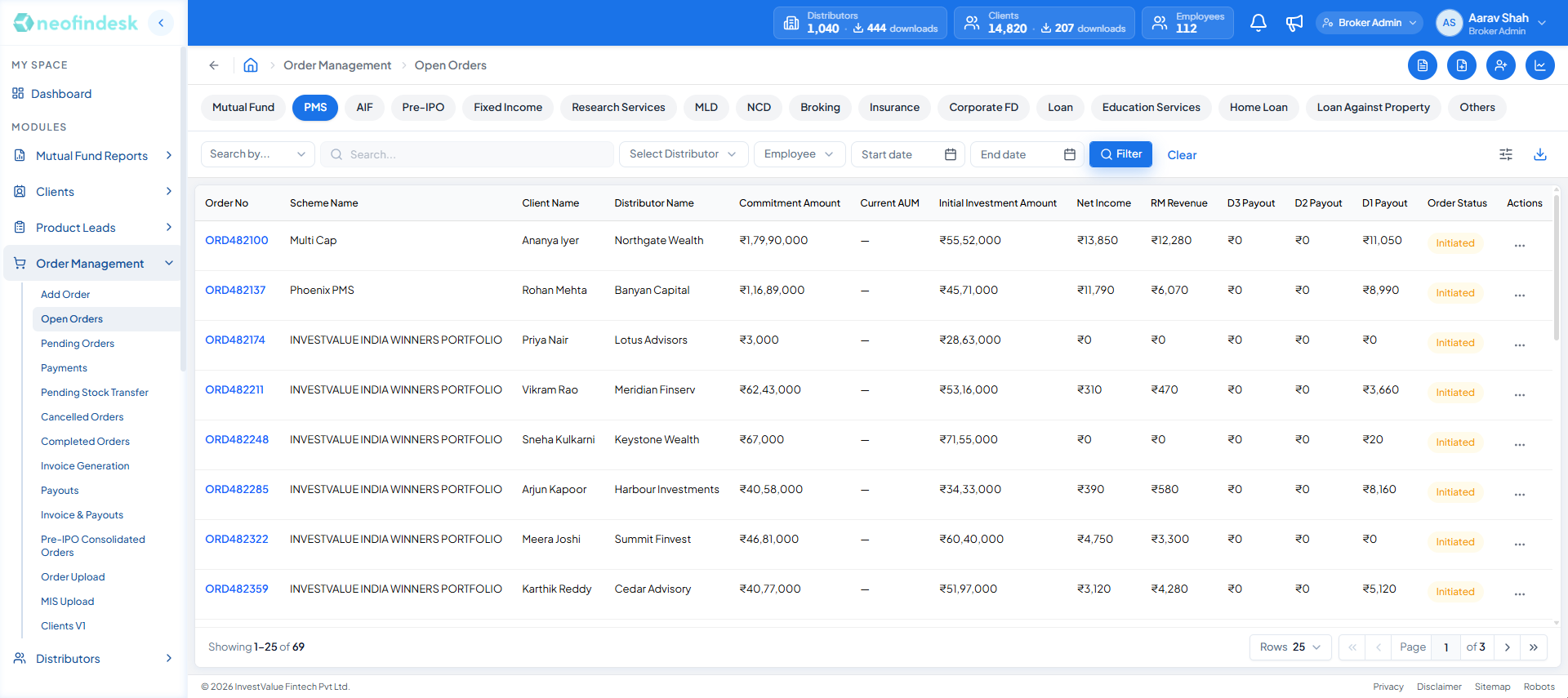
- Every asset class is a tab on the same table. Twelve at launch, sixteen today.
- Identity columns hold still across every class: order, scheme, client, distributor.
- Product columns resolve per class. PMS shows commitment, current AUM and initial investment.
- One status vocabulary for every product.
The advisor learns one table once, instead of twelve interfaces badly.
What it cost: the column set has to be configurable per asset class, which pushed real complexity into engineering rather than removing it. I still think that is the right place for it to live. Complexity in a config file is cheaper than complexity in a user’s head.
The test of the decision came after launch. The shell shipped with twelve asset classes in Open Orders and six in Add Order. It now carries sixteen in Open Orders and fifteen in Add Order, and none of the additions needed a new screen. Each one was a tab and a column configuration.
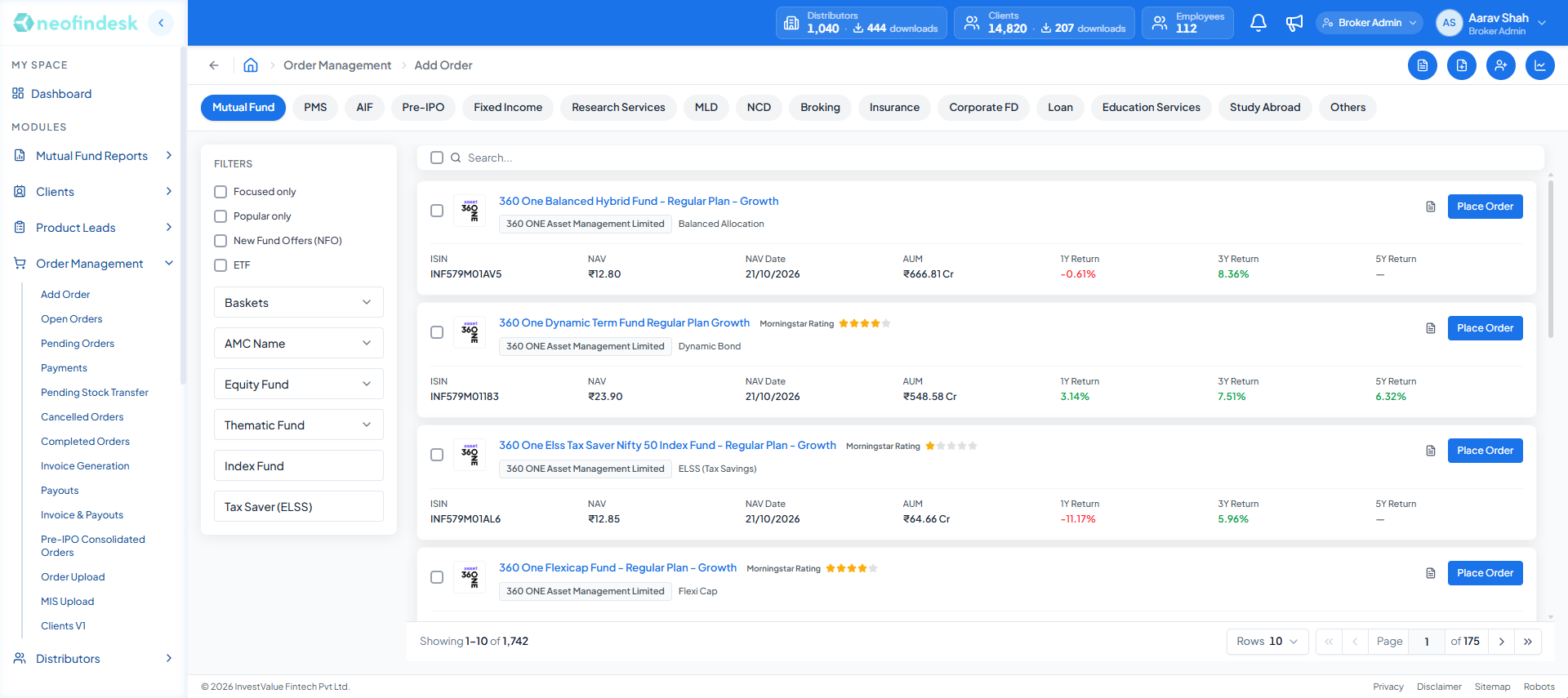
- The same tabs drive Add Order: fifteen classes, up from six at launch.
- A fixed filter panel narrows the list by basket, AMC and fund type.
- Place Order opens on this screen as a drawer, so the list never goes away.
- 1,742 mutual fund schemes in one paginated list.
Decision 02
Onboarding is a detour, not a destination
This is the change behind the 6× number, and most of it is not about the form itself.
The old flow sent the advisor away to onboard the client, and the order context died on the way. So the entire UCC journey moved into a drawer that opens over the Add Order screen. Look at the screen at the top of this page: the Add Order list is still there behind the drawer. The advisor never left.
Before
- 01Add Order, scheme chosen, client on the phone
- 02Order rejected: client has no UCC
- 03Leave for the client module, in a separate tool
- 04Complete KYC, bank, nominee and FATCA in one sitting or lose it
- 05Return to Add Order and find the scheme, the amount and the client again
- 06In practice: call the client back tomorrow
After
- 01Add Order, scheme chosen, client on the phone
- 02Block shows No UCC, with Generate UCC inside it
- 03Drawer opens over the order. Scheme stays selected behind it
- 04Save & Exit at any step; resume from the same step later
- 05Confirmation names CVL KRA and BSE STAR MF, and shows the UCC
- 06Close the drawer. The order is where it was left
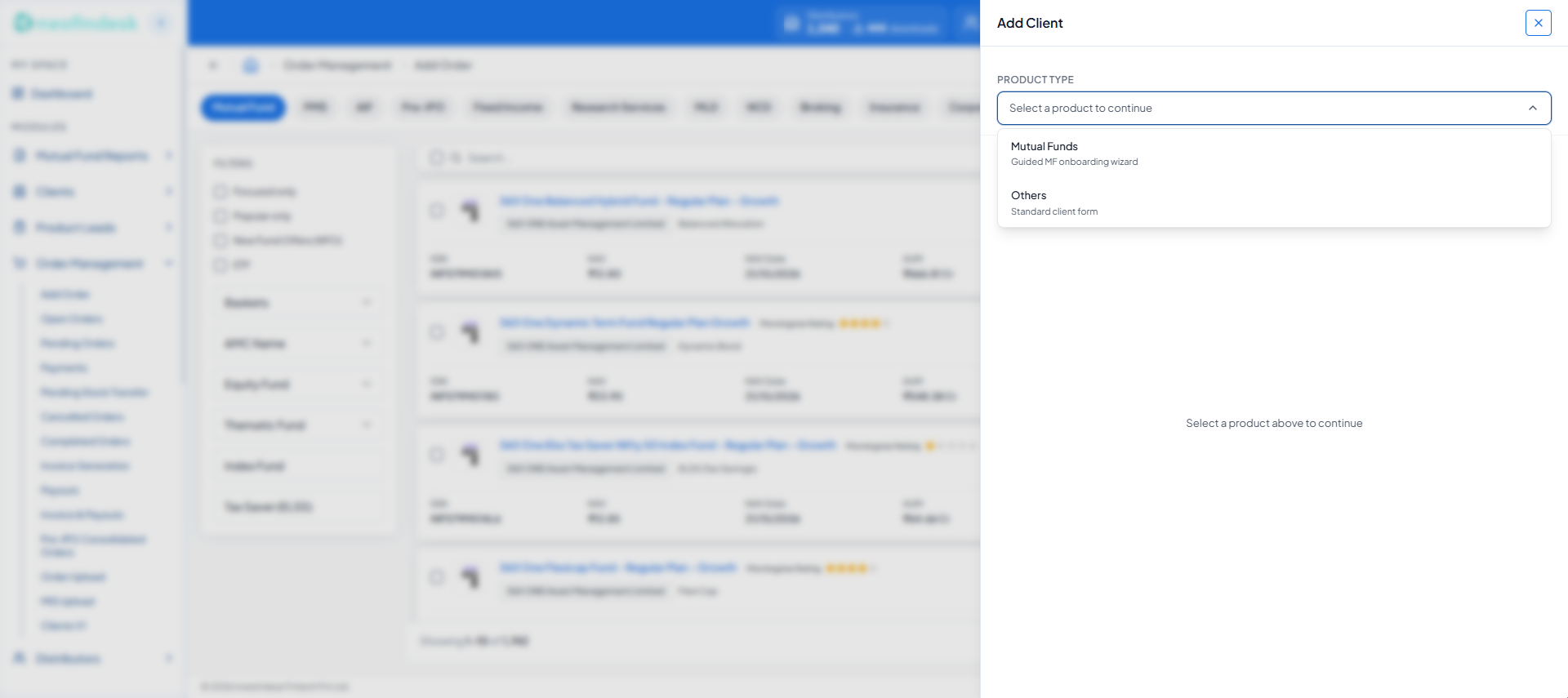
- Mutual funds get the guided wizard: it is the path that ends in a BSE STAR MF code.
- Every other product gets a standard client form, so the seven steps are only asked where they are needed.
The drawer is titled Update Profile rather than Onboarding, and the distinction matters. The client record already exists with a client code. What is missing is the UCC, the BSE STAR MF code that lets that client transact in mutual funds. So the job is not creating a person, it is completing a person, and the title says so.
Inside, the journey is sequenced by dependency rather than by convenience: Client Details, Bank, KYC Capture, Nominees, Documents, FATCA, Review. Each section carries one line explaining why it exists, like “These details create the client record and link a Mutual Fund investor profile.” That is not decoration. An advisor who understands why a field is required stops raising a support ticket about it.
Two details matter more than they look:
- Save & Exit sits beside Save & Continue. Onboarding a real client takes two phone calls and a document scan. A flow that cannot be paused is a flow that gets abandoned, and an abandoned flow is a lost order.
- Locked fields explain themselves. PAN and client name render disabled with an inline note saying they cannot change after creation. The alternative, letting someone type and rejecting it on submit, is the same constraint delivered as a failure.
- 1
Client Details
Creates the record, links the investor profile
- 2
Bank
Account and mandate setup
- 3
KYC Capture
CVL KRA registration
- 4
Nominees
Statutory nomination
- 5
Documents
Proof upload
- 6
FATCA / CRS
Tax residency declaration
- 7
Review
Confirm, then generate UCC
UCC generated
Names CVL KRA and BSE STAR MF, returns the number
Save & Exit is available at every step. Onboarding a real client takes two phone calls and a document scan, so the flow has to survive being paused.
Decision 03
End on certainty, not celebration
The final step does not say “Success”. It says what actually happened, and names the registries it happened in.
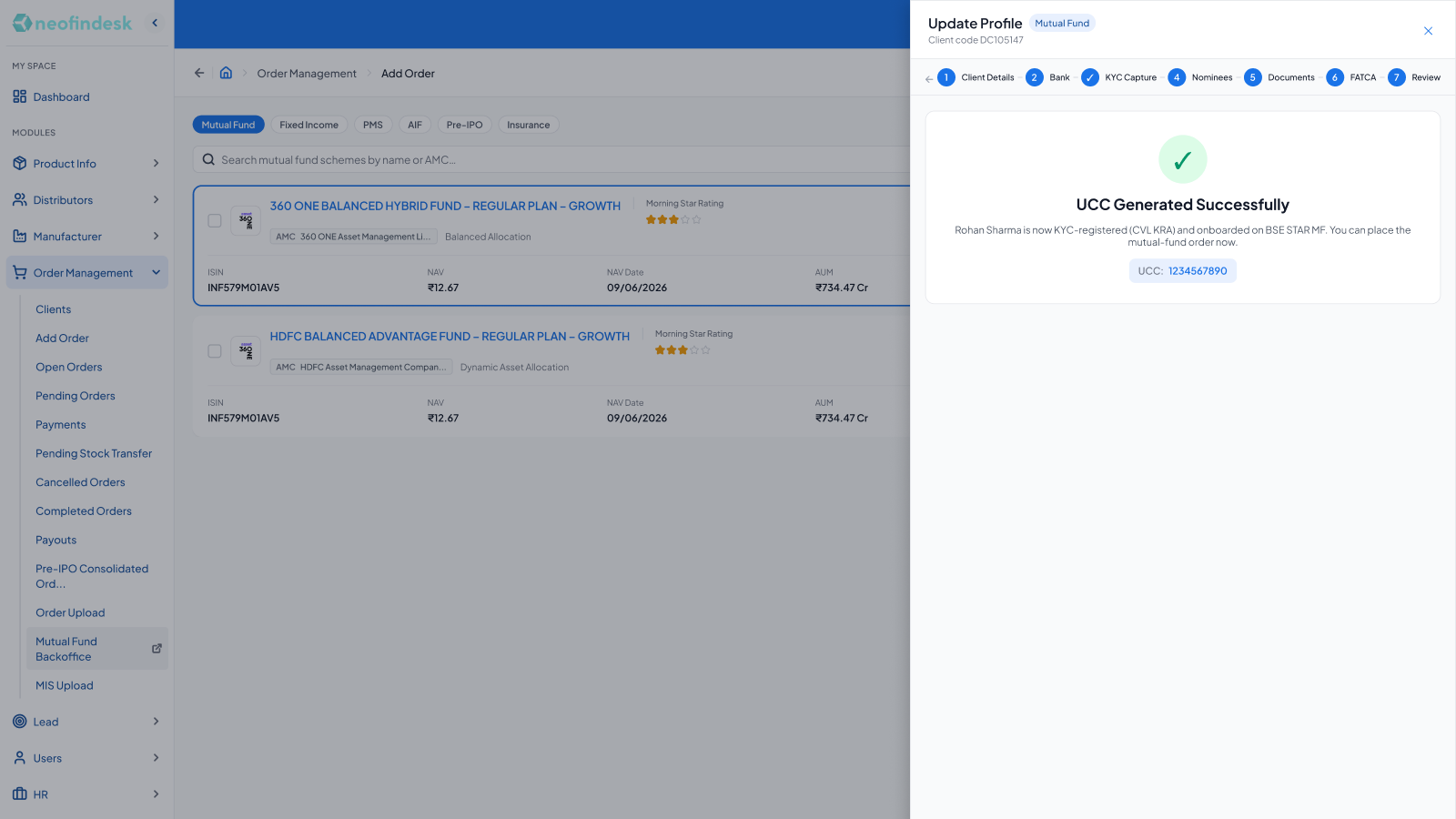
In a regulated flow, the user’s real question at the end is not “did the form submit?” It is “is this actually done, or does it bounce back to me in three days?” Naming the registries answers the question they were actually asking.
Decision 04
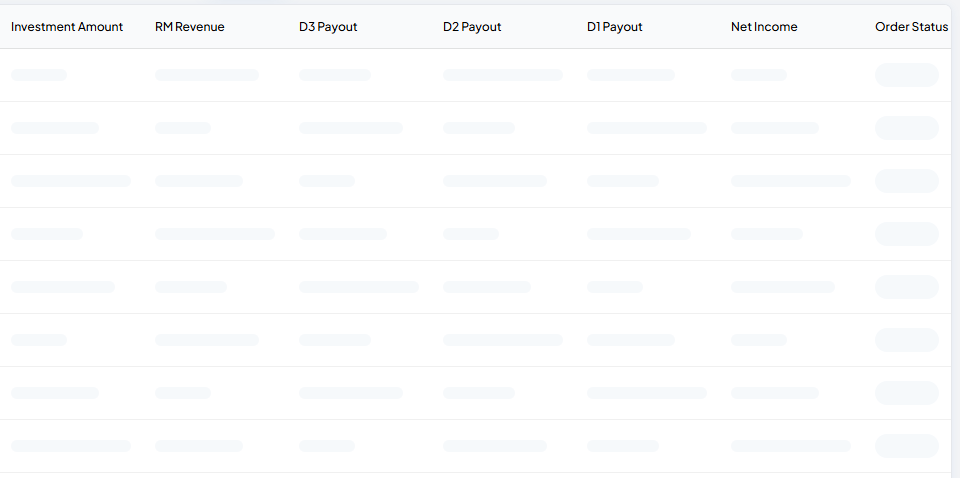
States are screens, so I drew them
Data-heavy B2B products do not fail on the happy path. They fail at three in the afternoon when a filter returns nothing and the user cannot tell whether the system is broken, still loading, or simply correct.
So every Order Management screen has a designed empty, loading and error state, plus selection with bulk actions and a filters-applied variant. They are named frames in the file, not afterthoughts left to implementation.
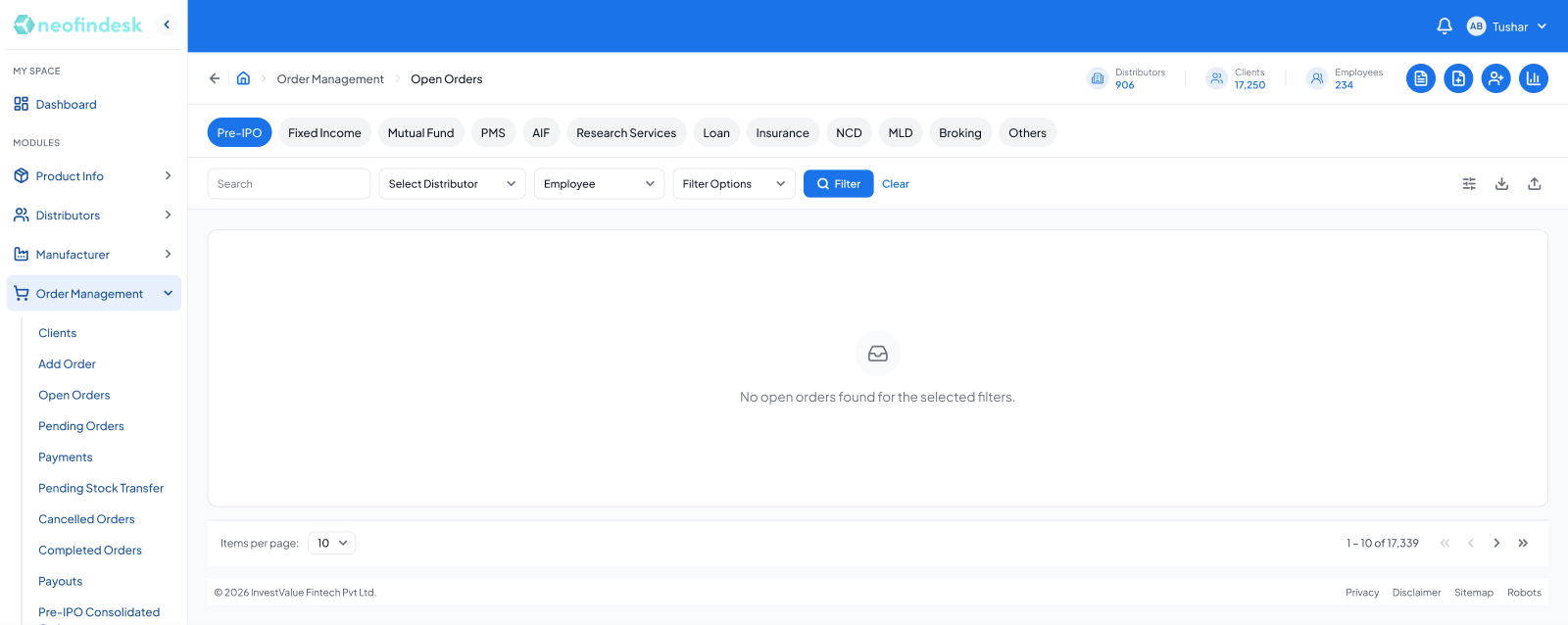
A generic “Nothing here yet” illustration would have hidden the actual cause. The copy points at the filters because the filters are what the user needs to change.
Decision 05
Progressive disclosure at real scale
The revenue sheet carries commission structures for every product category that pays one, and 1,710 mutual fund schemes underneath the first of them. Rendered flat, it is not a table, it is a wall.
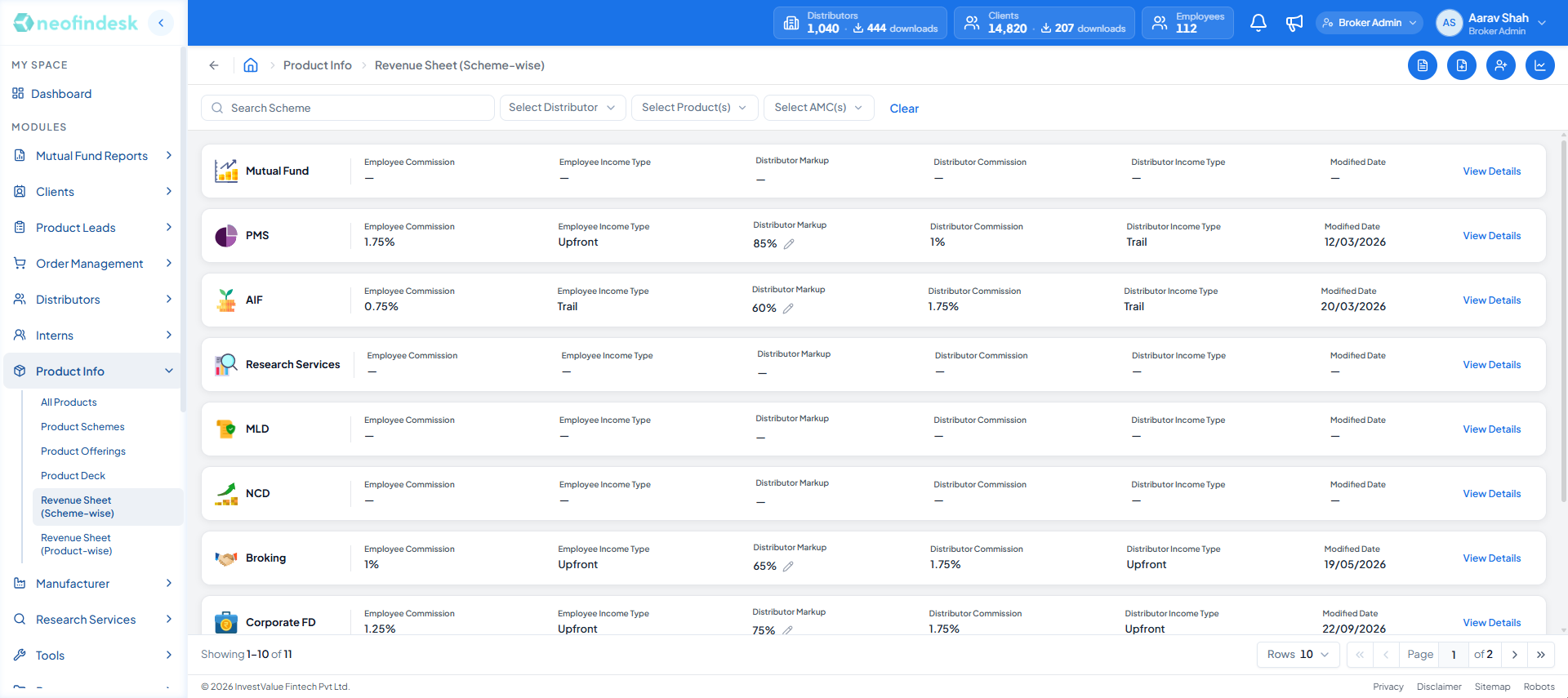
- Commission and income type are readable without opening the row.
- Markup carries an inline edit control.
- Trail or upfront gets its own column, because it decides when a distributor is paid.
- Scheme-level detail is one click away, per category.
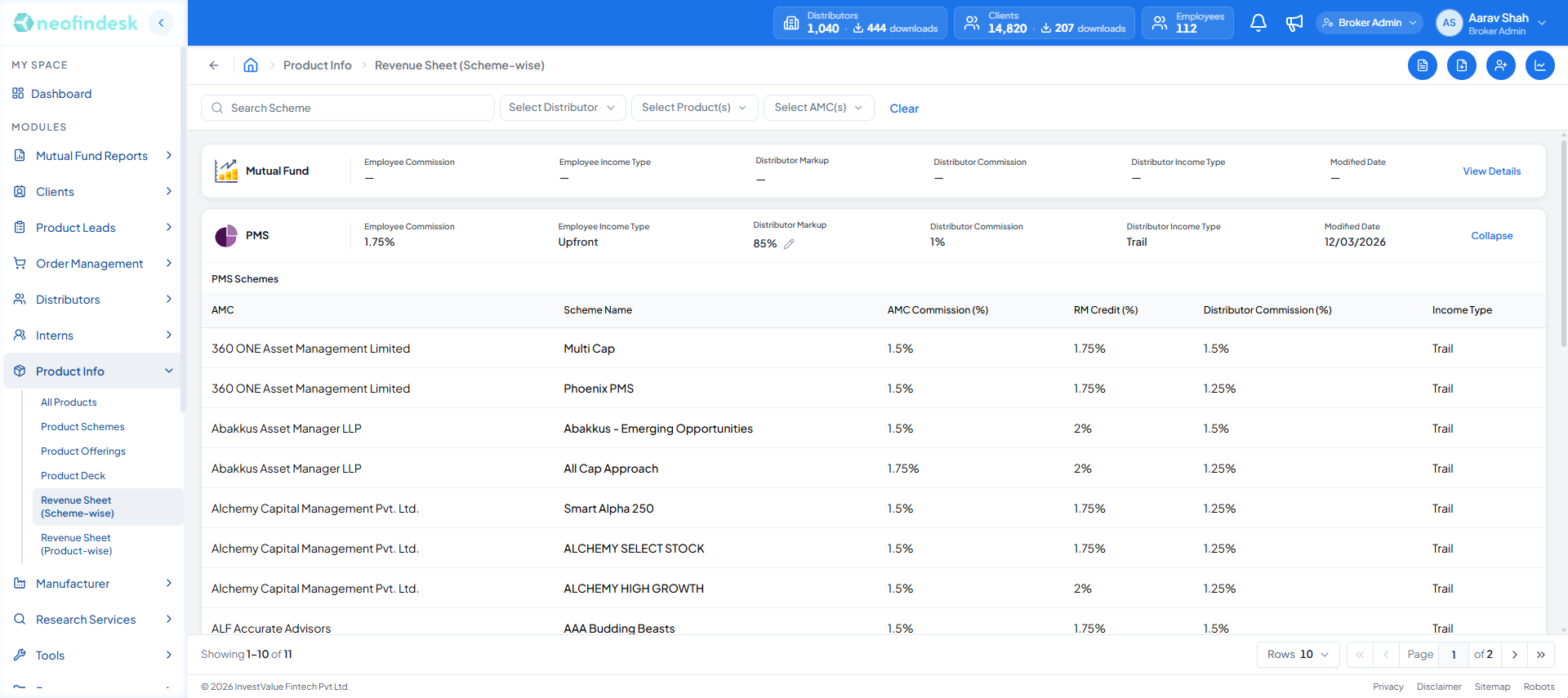
- Other categories stay collapsed while one is open.
- Schemes are listed by AMC.
- Each rate is its own column: AMC commission, RM credit, distributor commission.
- Collapse returns the sheet to one row per category.
Trail versus upfront earns its own column rather than hiding in a detail view, because it changes when a distributor actually gets paid. That is the number they came for.
Decision 06
Design every way it can fail
The list from the code audit had sixteen entries: seven validation toasts, six inline scheme and amount alerts, three blocking states inside the form. They fold down to six decision points on the main path, any of which can stop an advisor mid-call.
The left column below is the path when everything passes. The right column is what the advisor sees when it does not, and how they get moving again without leaving the screen.
- 01
Advisor opens Add Order
Asset class selected as a filter, not a separate screen
- 02
Choose scheme
ISIN, NAV, AMC and Morningstar rating shown on the card
- 03
Is a client selected?
Pass, continue
Validation toast
“Please select Client to proceed”
Client picker opens in place
- 04
Does the client have a UCC?
Pass, continue
Blocking state, in form
“UCC is required for this client. Please generate it before proceeding.”
Generate UCC sits inside the block. Opens the 7 step drawer over this screen, then returns here.
- 05
Does the scheme allow this order type?
Pass, continue
Inline alert
“SIP is not allowed for this scheme”
The unavailable option is disabled rather than failing on submit
- 06
For SIP, is there an approved mandate?
Pass, continue
Blocking state, in form
“No approved mandate. Tick First order today to use a pending one.”
Escape hatch. The rule holds, and the advisor is not stuck waiting days for approval.
- 07
Is the amount within scheme limits?
Pass, continue
Inline alert
“Minimum investment is ₹2,00,000”
Copy names the actual threshold, never just Invalid amount
- 08
Does a folio exist for this AMC?
Pass, continue
Field state
“No folio”
Four distinct states: has folios, no folios, empty options, loading
- 09
Order placed
Every one of the sixteen got its own response rather than sharing a generic error. The full set lives in one documentation frame, so engineering and design were arguing about the same list.
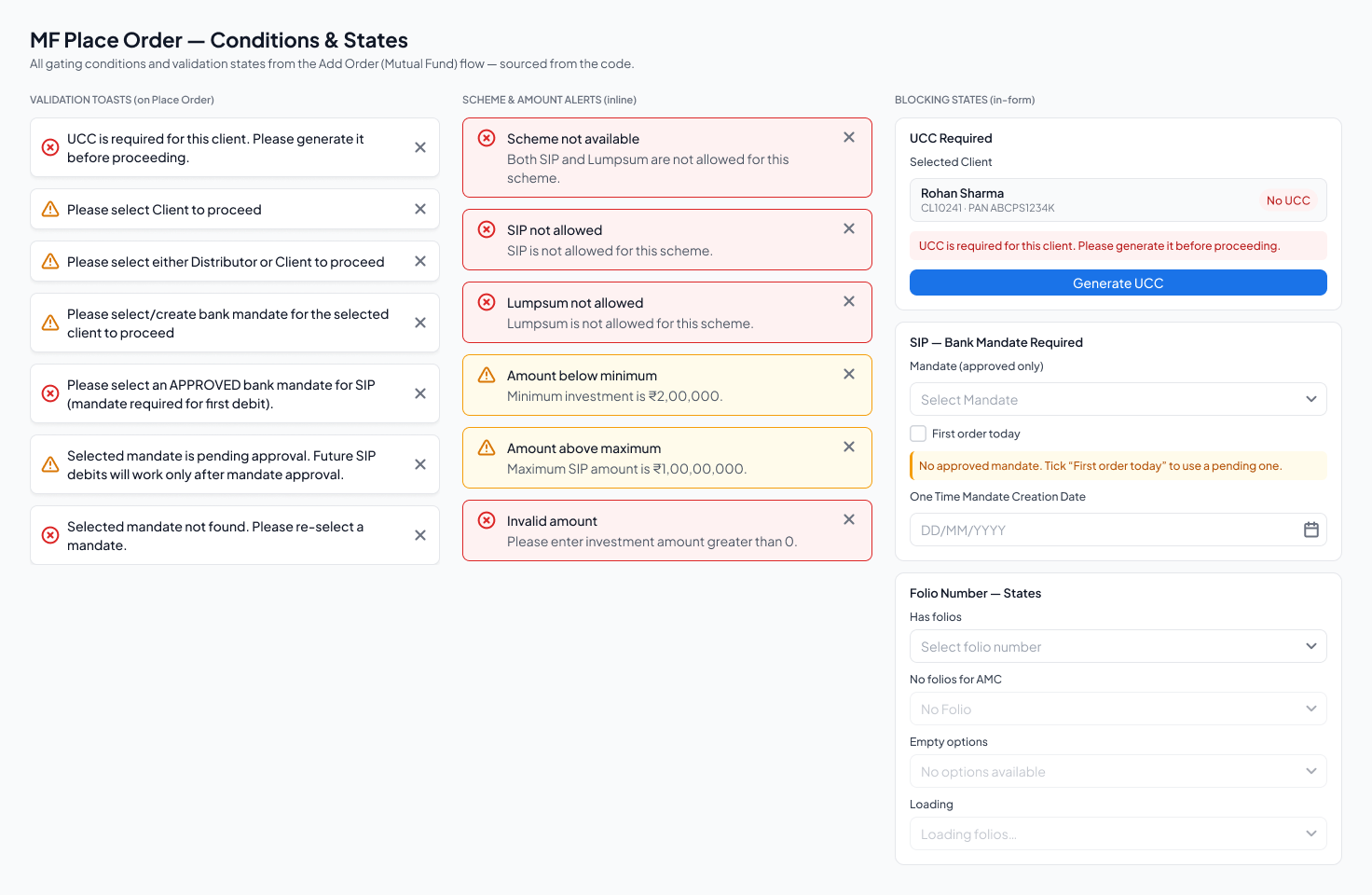
Two things in there I would defend in any review:
- A blocking state carries its own fix. When a client has no UCC, the block is not a dead end with a message. It shows the client, marks them No UCC, and puts a Generate UCC button inside the block. The obstacle and the remedy occupy the same space.
- Real workflows need escape hatches. A SIP legally needs an approved mandate, but approval takes days and advisors place first orders the same day. So the mandate block offers “Tick First order today to use a pending one”. The rule holds, and the advisor is not stuck for three days.
Every alert carries the number that would have passed: “Minimum investment is ₹2,00,000”, “Maximum SIP amount is ₹1,00,00,000”. The one alert titled Invalid amount is the blank-or-zero case, and even that one says what to enter. An advisor should never have to guess what would have worked.
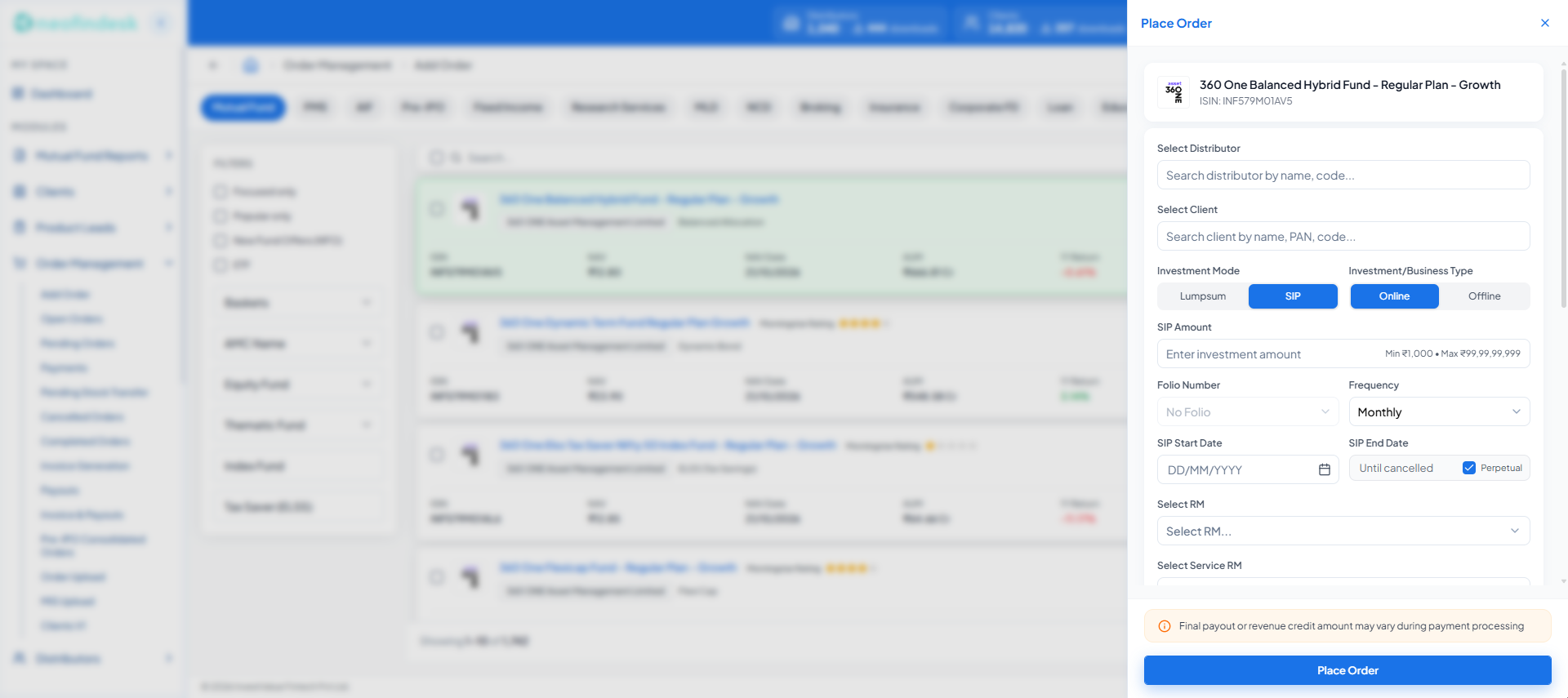
- The chosen scheme stays highlighted in the list behind the drawer.
- The scheme is pinned at the top, so the advisor always sees what they are ordering.
- Mode and channel are toggles, with SIP and Online preselected.
- The limits sit inside the amount field before anything can fail.
- The payout caveat is stated before submission, not after.
Testing it before it was expensive
Prototypes went in front of real advisors before engineering built anything, and what they did changed the flow. The numbers below are from those sessions; the two rows after them are the changes I would point to first.
3
Rounds of usability testing
On prototypes, before build
10
Advisors tested
Real advisors, real tasks
70 → 95%
Task success
Round 1 to round 3, approximate
~12
Design changes from findings
Four of them below
- 01
What we saw
Advisors could not finish onboarding in one sitting. A missing document or a second call to the client meant starting again.
What I changed
Save & Exit beside Save & Continue at every step, resuming at the step they left.
- 02
What we saw
The original step order confused advisors. They hit fields that depended on information from a later step.
What I changed
Re-sequenced by dependency: Client Details, Bank, KYC Capture, Nominees, Documents, FATCA, Review.
- 03
What we saw
Advisors tried to correct PAN and client name, and were rejected on submit.
What I changed
Both fields locked up front, with an inline note saying they cannot change once the client exists.
- 04
What we saw
Advisors did not know why some fields were required.
What I changed
One line under each section saying why it exists, in the advisor's language rather than the regulator's.
The system underneath
None of this scales without a shared vocabulary. I built the component library and token set from scratch, shared across NeoFinDesk and InvestValue Capital.
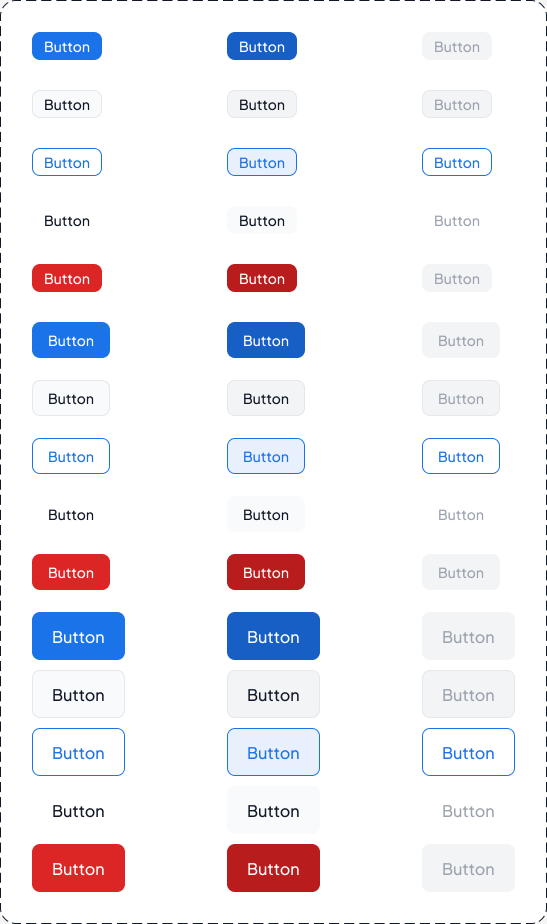
It runs to 53 component families and 2,077 variants, built on explicit variant properties (size, style, state) rather than duplicated layers. Two of those families are not components at all, they are usage documentation, because a library nobody knows how to apply drifts within a quarter.
The tokens are semantic rather than literal. The value is --color-bg-brand, not --color-blue-600. That is the difference between a theme you can change and a find-and-replace you have to survive.
Semantic colour
--color-bg-brand#1a73e8--color-text-primary#111827--color-text-tertiary#6b7280--color-bg-success#059669--color-bg-danger#dc2626--color-border-default#e5e7eb
Foundations
- Typeface
- Plus Jakarta Sans
- Spacing
- 4 · 8 · 12 · 16 · 24
- Radius
- 8 · 12 · 16 · full
- Elevation
- sm · md · lg, layered
- Type roles
- Heading · Body · Label · Caption · Stat
Chart palette
A dedicated scale, tuned to stay distinguishable in a donut with eight segments. In a product where every dashboard is a chart, leaving series colour to individual judgement guarantees drift.
Design library
The NFD Design Library, in code
The Figma library is half of the system. The other half is the one engineering actually ships: I built the frontend and documented every component, token and state straight from the production source, so design and code cannot drift apart.
67
Documented sections
5
Page templates
3
Breakpoints: 360, 768, 1280
1
Source: the production code
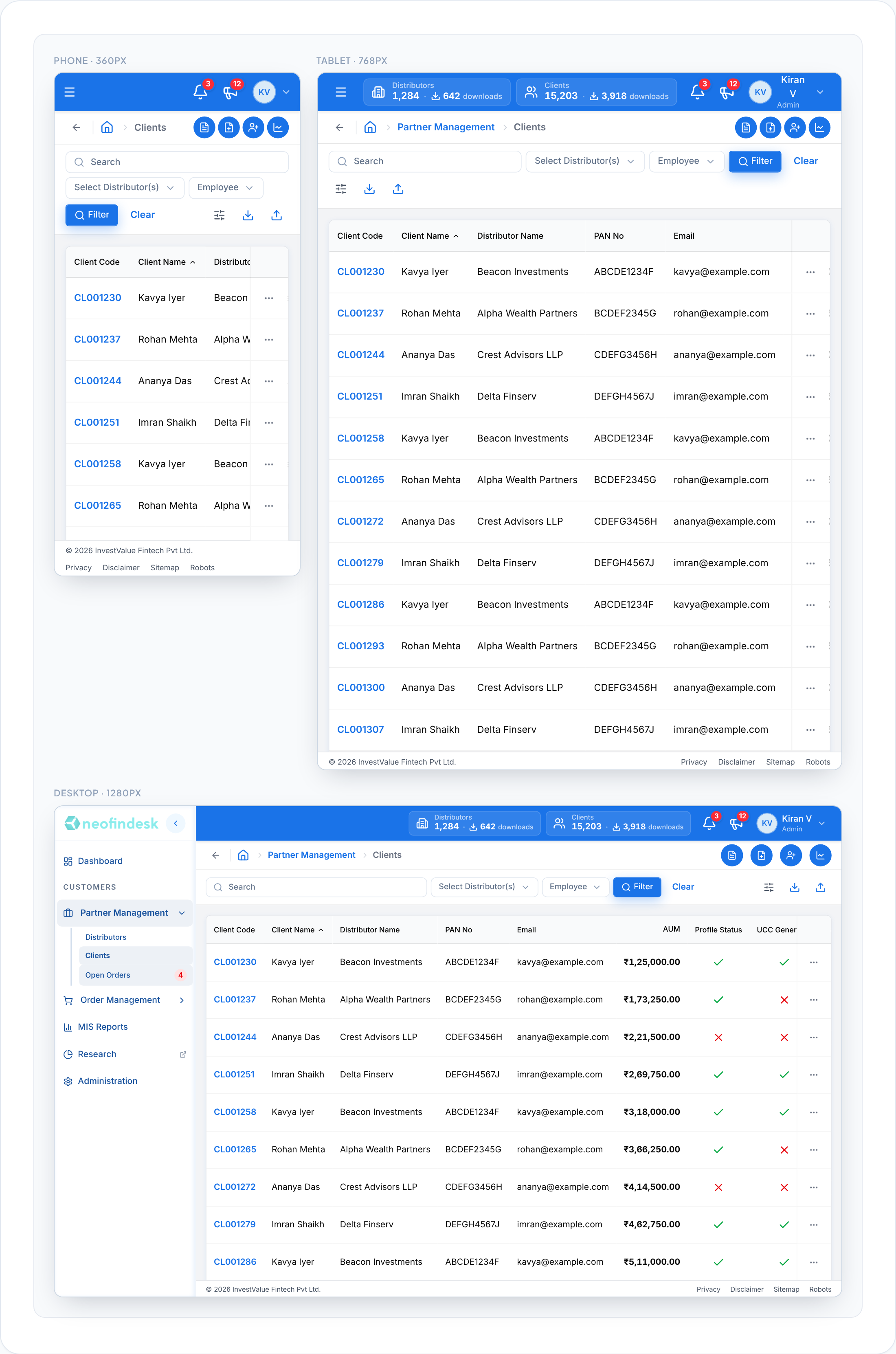
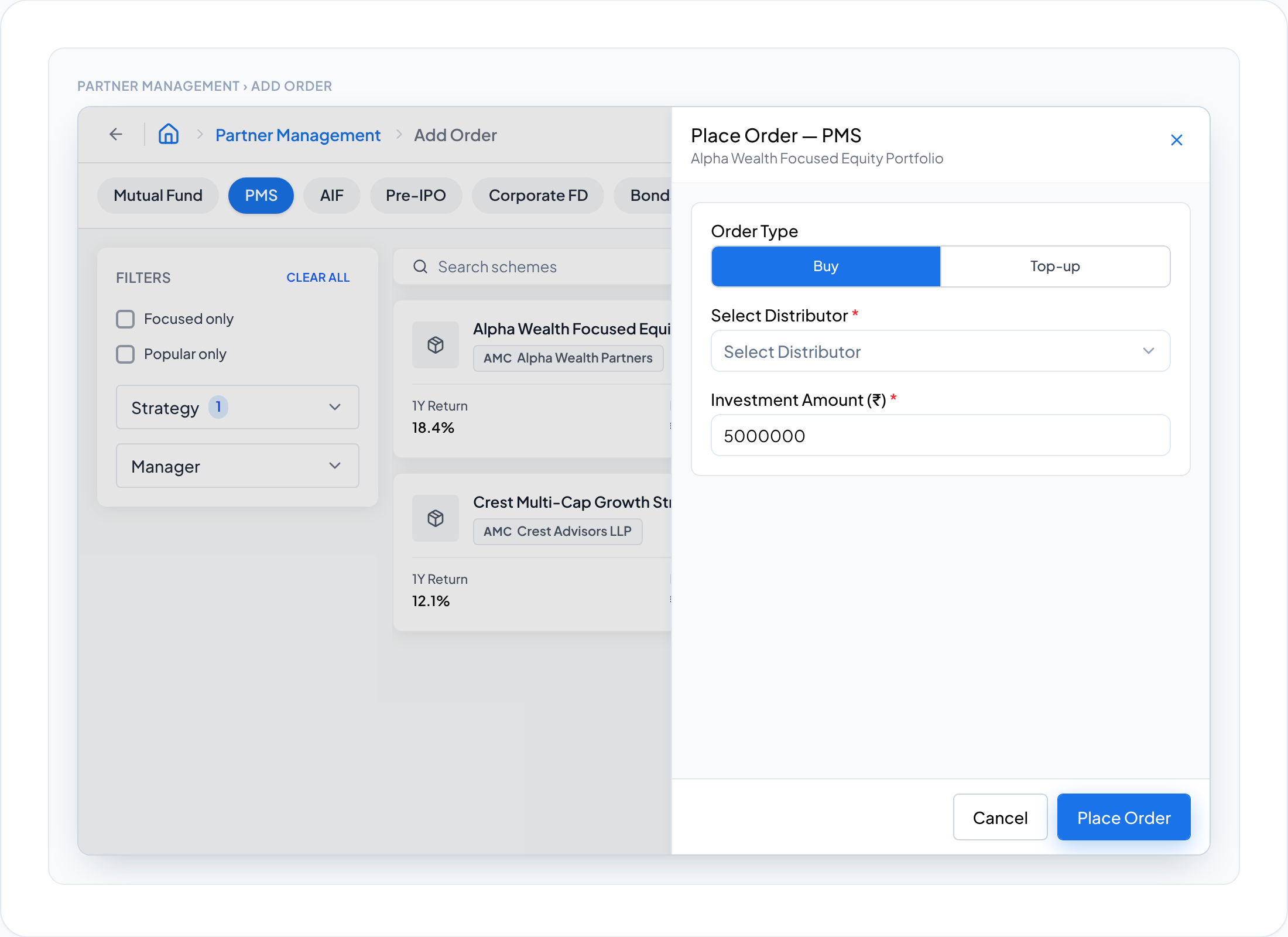
Page template: the Add Order flow, assembled from library parts. 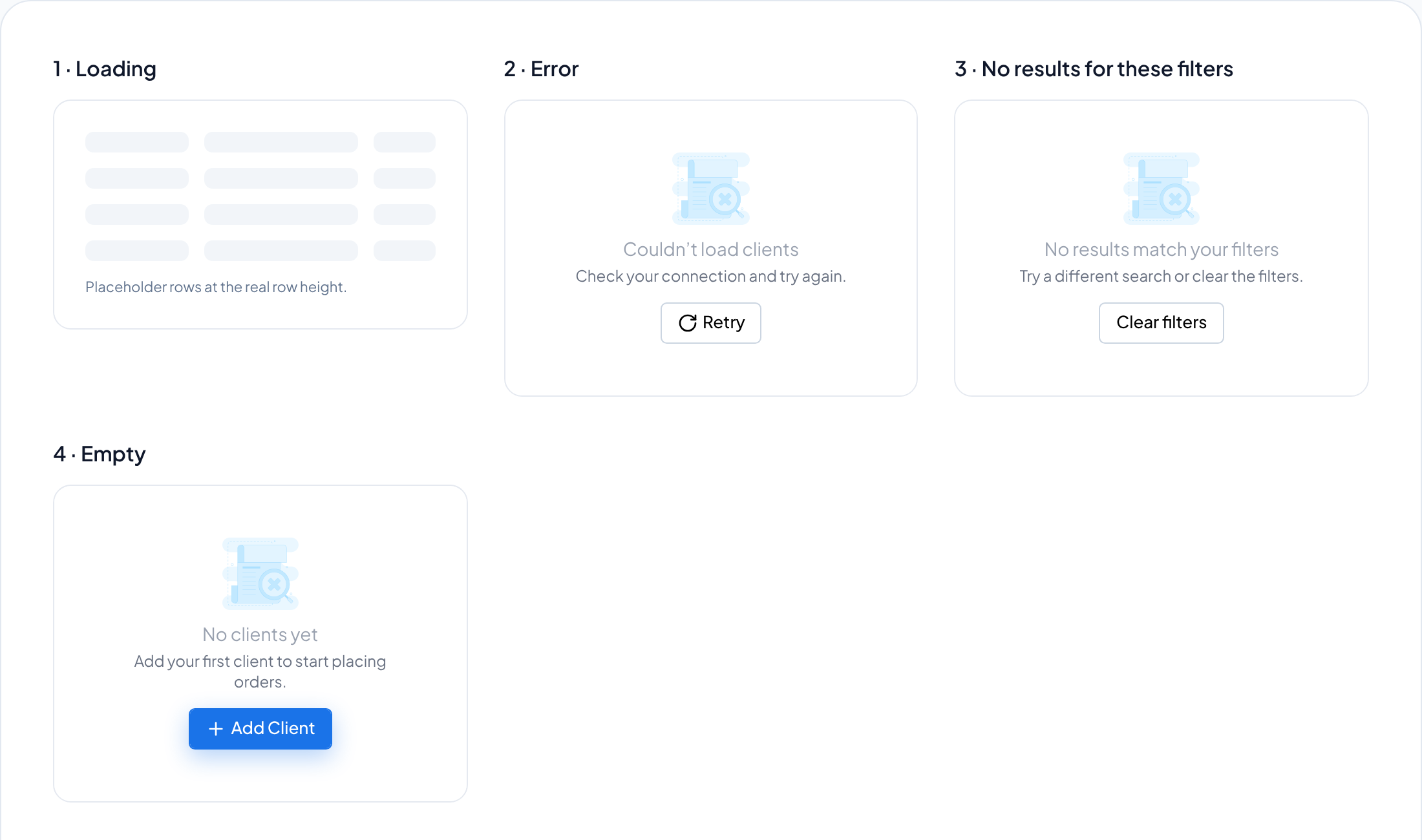
Every list has four states, and each one names its way out. 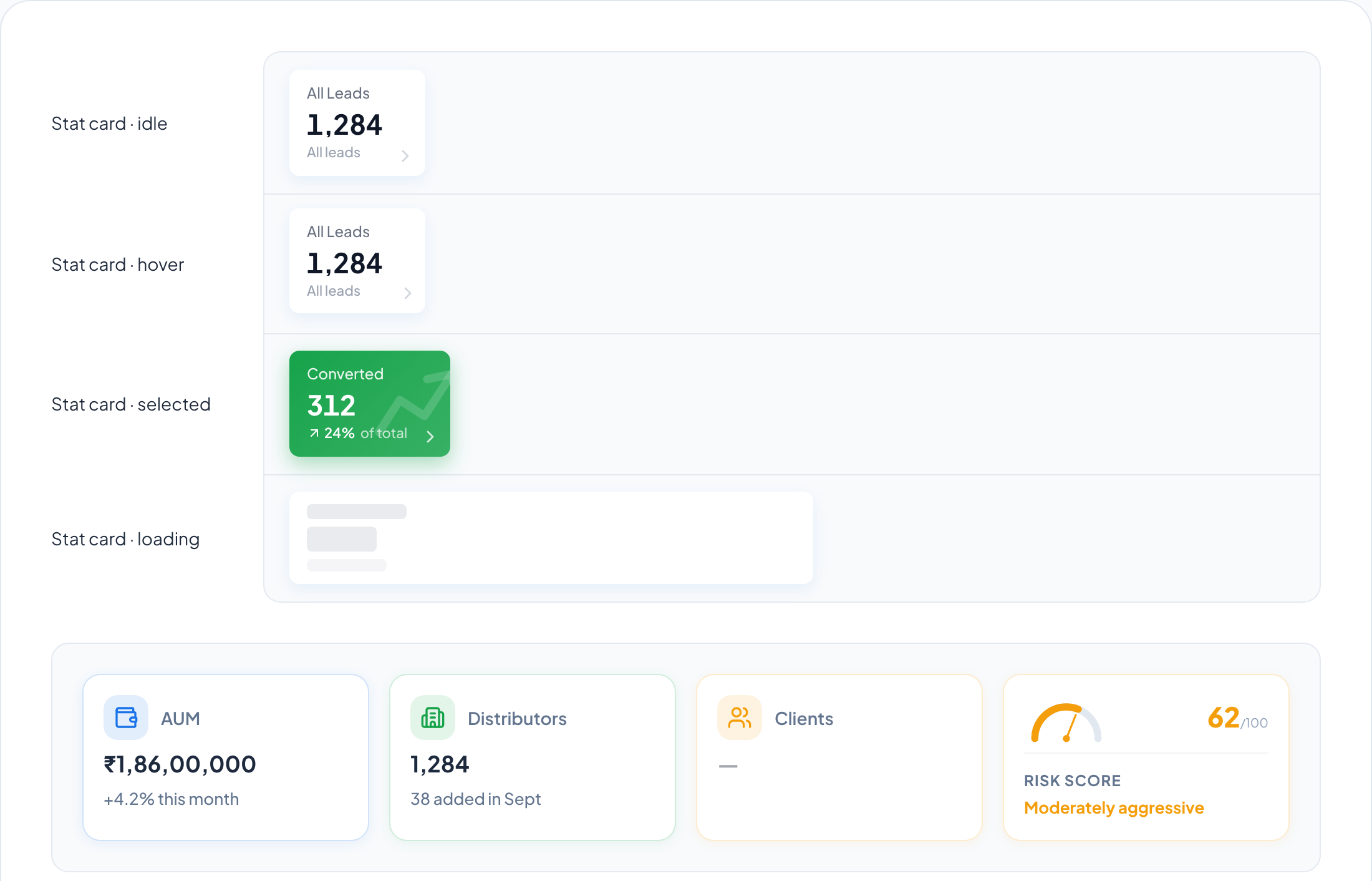
KPI cards with every interactive state drawn, including loading. 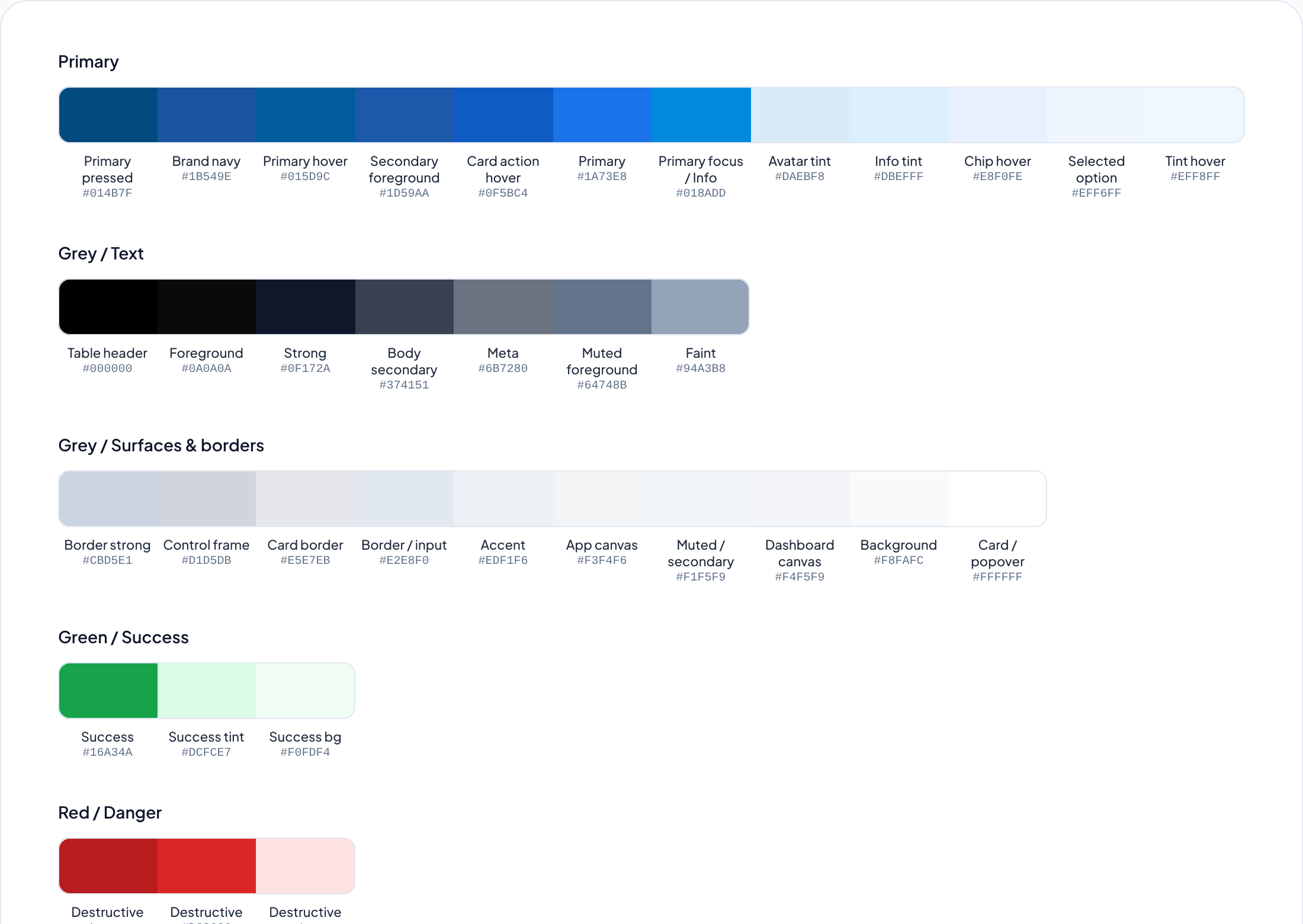
Colour named by role, so a swatch says where it is used.
Leading the work
Leading meant more than the screens: growing the junior designer, setting the team’s working rhythm, and holding a position when it was contested.
Growing the junior designer
I handed over ownership in stages over about two months: research support first, then the system’s states, then whole flows.
- Stage 01Start
Support
Supported research: notes and synthesis on the interviews and shadowing sessions.
- Stage 02First weeks
Pair
Designed the empty, loading and error states, with me reviewing every screen.
- Stage 03By month 2
Own
Owns flows end to end and ships them without my edits.
How the team worked
Weekly
1:1 with the junior designer
Weekly
Design critique
~20
UI bugs caught in design QA
Before release, with our QA engineer
2
Products on one library
NeoFinDesk and InvestValue Capital
One disagreement, and how it resolved
The tension
My PM wanted onboarding kept in the existing client module. Reusing it was the faster thing to ship, and that is a fair argument.
My call
I argued for the drawer, with three pieces of evidence: more than 15 of 20 shadowing sessions where the order died when the advisor left, support tickets about lost orders and call-backs, and a prototype test of the drawer against the separate module.
How it landed
The drawer shipped. Onboarding fell from about 30 minutes to under 5, by system timestamps over the first three months after launch.
Outcomes
Three bets, three different states of evidence. I would rather list them that way than dress the unmeasured ones up as results.
6×
Faster client onboarding
About 30 min to under 5, system timestamps, first 3 months
12
Asset classes, one shell
Shipped. No class has needed its own screen
16 / 16
Gating conditions designed
Up from 3 to 5 documented before the audit
~95%
Task success in testing
Up from about 70% in round 1
- H1, onboarding in a drawer: 6× faster. About 30 minutes, often finished on a call-back the next day, down to under 5, measured by system timestamps over the first three months after launch. The mechanism matters as much as the number: the advisor stopped losing context, and a flow that can be paused stopped being abandoned.
- H2, one shell for twelve classes: shipped, judged by absence. The falsifier is a class that needs its own screen, or a per-class exception to the shared status vocabulary. Absence of that is weak evidence, and I present it as that rather than as a win.
- H3, designed states cut support load: not yet measured. The sixteen states are live. The ticket comparison against the previous quarter is the next thing I want from ops, and until I have it this bet is a bet.
The platform serves 540 or more institutional and distribution partners. That is the scale the design has to hold at, not a result of the design, so it lives at the top of the page and not here.
What I would do differently
Three things I am not satisfied with, in the order they bother me.
- The seven-step stepper is honest but daunting. Showing the full length is the right call for trust, but it still reads as long on first contact. I would test a two-phase framing, identify the client and then satisfy compliance, to shorten the perceived distance without hiding anything.
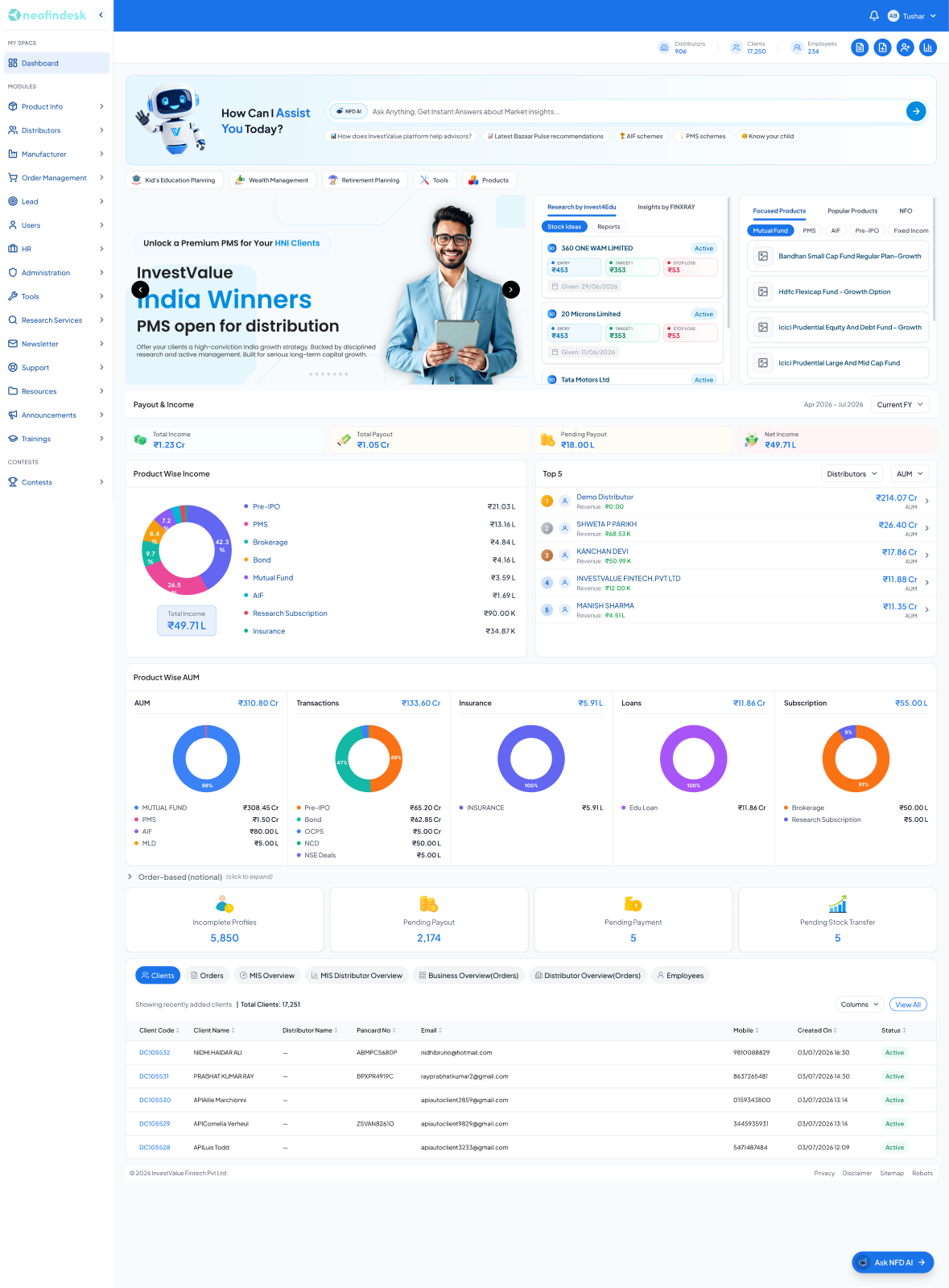
- The dashboard serves the power user well and the new distributor poorly. It is dense because experienced RMs asked for density. A role-aware default layout is the obvious next move, and I should have pushed for it sooner. The single-segment donuts under Product Wise AUM are the visible symptom: a chart with one slice is a number wearing a costume, and it should render as a number.
- Partial failure is still underspecified. I covered empty, loading and error thoroughly. But the real multi-issuer failure mode is one issuer’s API being down while eleven are fine, and the interface does not yet say that clearly. That is the next piece of work.
Next
More work, or get in touch.